
Best Graphics Settings of CarX Street for Low-End Devices.
CarX Street is one of the most visually impressive open-world racing games available on Android, with realistic car physics, detailed environments, and advanced lighting effects. Many players using phones with 2GB, 3GB, or 4GB of RAM face common issues such as lag, FPS drops, overheating, and sudden crashes.
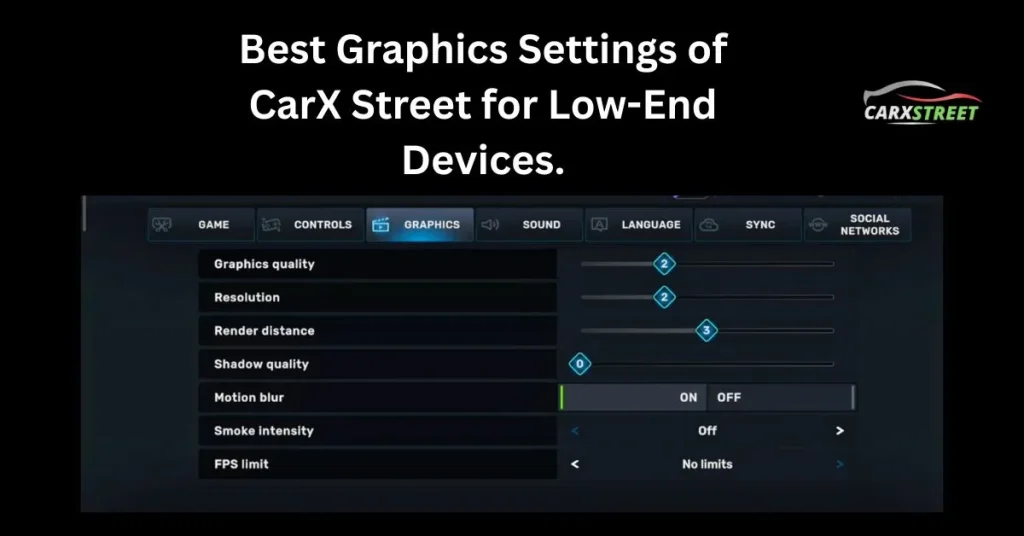
You’ll learn the best graphics settings of CarX Street for low-end devices, tested and optimised to deliver smoother Gameplay without ruining the racing experience. Whether you’re using the official version or CarX Street Mod APK, these settings will help you get the best possible performance.
Best Graphics Settings of CarX Street for Low-End Devices.
Below is a step-by-step, tested configuration designed for low-end and budget Android phones.
Open Graphics Menu.
1. Launch CarX Street.
2. Go to Settings.
3. Tap on Graphics.
Graphics Quality
Set it to low
Faster loading
Better FPS
Less RAM usage
Resolution Scale
1. Set to: 70% – 80%
2. 70% for 2GB–3GB RAM devices.
3. 80% for 4GB RAM devices.
Frame Rate (FPS Limit)
Set to: 30 FPS.
30 FPS = stable performance.
Less overheating.
Reduced battery drain.
Detailed Recommended Settings Summary (Quick View).
| Setting | Value |
| Graphics Quality | Low |
| Resolution Scale | 70–80% |
| FPS Limit | 30 |
| Shadows | Off |
| Reflections | Off |
| Motion Blur | Off |
| Depth of Field | Off |
| Anti-Aliasing | Off/ Low |
| Texture Quality | Low |
Frequently Asked Questions.
Conclusion.
CarX Street is a demanding game, but that doesn’t mean low-end users can’t enjoy it. By applying the best graphics settings of CarX Street for low-end devices, you can significantly reduce lag, stabilise FPS, and enjoy smoother racing, even on budget smartphones.